- 14 min read


If you’re still sending survey links only through email, you’re missing one of the fastest-growing ways to collect customer feedback.
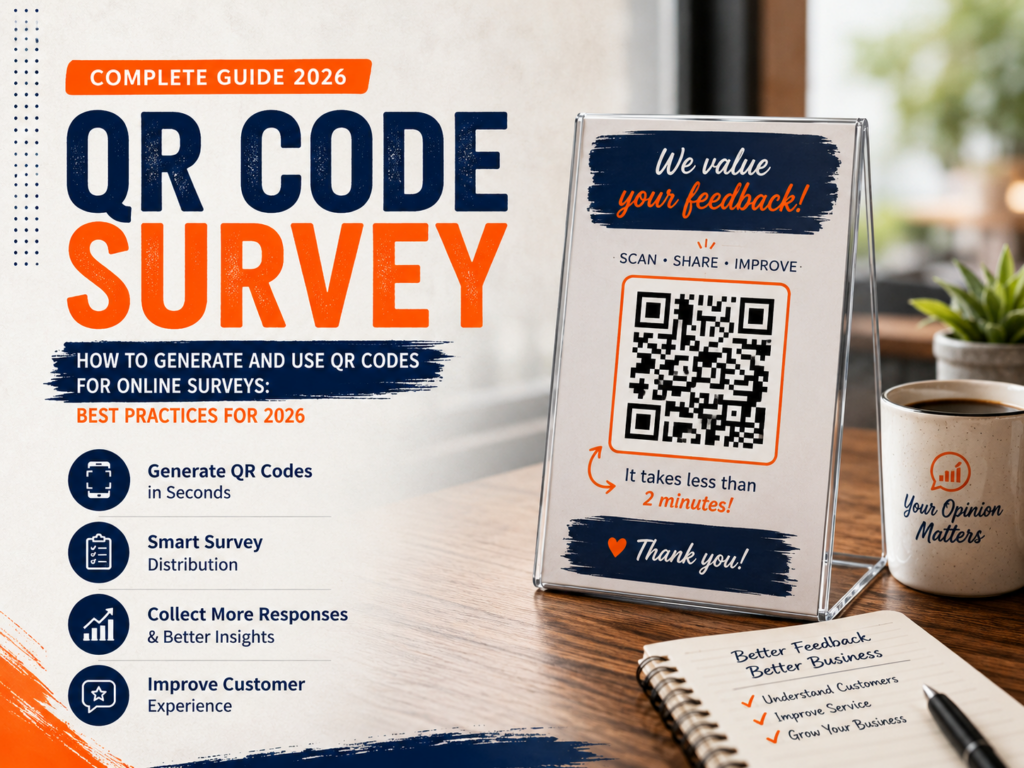
The QR code survey has become one of the most effective survey distribution methods for businesses in 2026. Customers can scan a code with their smartphone camera, answer a survey in seconds, and provide feedback while their experience is still fresh.
You’ll see QR code surveys everywhere—from restaurant tables and retail stores to hospitals, trade shows, hotels, product packaging, invoices, and event booths.
But simply creating a QR code isn’t enough.
To maximize response rates, you need the right survey, the right placement, and the right strategy.
In this guide, you’ll learn:
- What a QR code survey is
- How to create a survey with a QR code
- How to make a QR code for a survey link
- Where businesses should place survey QR codes
- Common mistakes to avoid
- Best practices that increase completion rates
- How SurveyFlip makes QR code surveys simple
Let’s get started.
What Is a QR Code Survey?
A QR code survey is an online questionnaire that people access by scanning a QR code with their smartphone.
Instead of typing a long website address, users simply point their phone camera at the QR code and are instantly taken to your survey.
This reduces friction dramatically.
The fewer steps required to reach your survey, the more likely people are to complete it.
Businesses use QR code surveys for:
- Customer feedback
- Employee feedback
- Product reviews
- Event evaluations
- Restaurant surveys
- Healthcare satisfaction surveys
- Hotel guest feedback
- Retail experience surveys
- Training evaluations
- Market research
Why QR Code Surveys Continue Growing in 2026
Consumer behavior has changed.
Nearly everyone carries a smartphone, and QR codes have become part of everyday life.
People scan QR codes to:
- View restaurant menus
- Pay bills
- Join Wi-Fi networks
- Download apps
- Access event tickets
- Leave reviews
- Complete surveys
Instead of asking customers to remember a website later, businesses capture feedback while customers are already engaged.
That’s why QR code surveys consistently outperform many traditional survey distribution methods.
Benefits of Using QR Codes for Customer Feedback
Higher Response Rates
Customers can respond immediately.
There’s no need to:
- Search their email
- Remember a survey link
- Visit a website later
Less effort means more completed surveys.
Real-Time Feedback
You capture opinions while experiences are fresh.
Instead of asking customers days later, you’re collecting feedback at the exact moment they finish:
- Eating
- Shopping
- Receiving service
- Checking out
- Attending an event
Fresh feedback is more accurate.
Easy to Deploy
A single QR code can be printed on:
- Table tents
- Posters
- Flyers
- Product packaging
- Receipts
- Business cards
- Store displays
- Event banners
- Brochures
No complicated setup required.
Lower Costs
Unlike paper surveys, QR code surveys don’t require:
- Printing multiple forms
- Manual data entry
- Physical collection
Everything is digital.
Better Data Quality
Responses automatically enter your survey dashboard.
- No transcription errors.
- No missing paperwork.
- No spreadsheet cleanup.
Industries That Benefit Most from QR Code Surveys
Restaurants
Restaurants use QR codes on:
- Tables
- Receipts
- Menus
- Takeout packaging
Customers can rate:
- Food quality
- Service
- Wait times
- Cleanliness
- Overall experience
Retail Stores
Retailers gather feedback about:
- Staff helpfulness
- Store layout
- Checkout experience
- Product availability
Hotels
Hotels place QR codes in:
- Guest rooms
- Lobby areas
- Checkout receipts
Guests can instantly review their stay.
Healthcare
Hospitals and clinics use QR surveys to measure:
- Patient satisfaction
- Wait times
- Staff communication
- Overall experience
Events
Conference organizers collect feedback immediately after:
- Sessions
- Workshops
- Keynote presentations
Response rates are significantly higher than follow-up emails.
Education
Schools and universities use QR surveys for:
- Course evaluations
- Student feedback
- Workshop assessments
- Event satisfaction
How to Create a Survey With a QR Code
Creating a QR survey is surprisingly simple.
Step 1: Build Your Survey
Use an online survey platform such as Survey Flip.
Include only the questions necessary to achieve your goal.
Avoid making surveys longer than necessary.
Step 2: Publish Your Survey
Once your survey is complete, publish it.
Your Online Survey platform will generate a survey URL.
Step 3: Generate the QR Code
Paste the survey link into a QR code generator.
Many survey platforms also generate QR codes automatically like Survey Flip.
This creates a scannable image linked directly to your survey.
Step 4: Test the QR Code
Always test:
- Android phones
- iPhones
- Different camera apps
Make sure the survey opens instantly.
Step 5: Print or Share
Place the QR code where customers naturally pause.
Examples include:
- Checkout counters
- Restaurant tables
- Waiting rooms
- Product packaging
- Event exits
How to Make a QR Code for a Survey Link
If your survey platform doesn’t create QR codes automatically, the process is straightforward.
You’ll need:
- Your survey URL
- A QR code generator
- PNG or SVG download
After generating the QR code:
- Download the image
- Add it to your marketing materials
- Test before publishing
Always use high-resolution files for printing.
Best Places to Use QR Codes for Customer Feedback
Location matters.
Even a great survey won’t receive responses if customers never notice it.
Effective placements include:
Restaurant Tables
Guests have time to scan while waiting for the bill.
Receipts
Customers can provide feedback immediately after purchase.
Product Packaging
Perfect for:
- Food products
- Electronics
- Subscription boxes
Checkout Counters
Capture customers before they leave.
Waiting Rooms
Healthcare providers can gather feedback after appointments.
Hotel Rooms
Guests can review their stay before checkout.
Event Exits
People are already reflecting on their experience.
Digital Screens
Display QR codes on:
- Kiosks
- POS displays
- TV screens
Best Practices for QR Code Surveys
Keep Surveys Short
Aim for:
5–10 questions
The faster the survey, the higher the completion rate.
Tell People Why They Should Scan
Don’t simply display a QR code.
Instead write:
“Tell us about your experience.”
“Help us improve.”
“Complete our 2-minute survey.”
Clear instructions increase scans.
Offer Incentives Carefully
Examples include:
- Discount coupons
- Loyalty points
- Giveaway entries
Avoid making incentives so large that they encourage dishonest responses.
Optimize for Mobile
QR surveys should load perfectly on smartphones.
Use:
- Large buttons
- Short questions
- Fast-loading pages
Make the QR Code Easy to Scan
Use:
- High contrast
- White background
- Adequate size
Tiny QR codes frustrate users.
Test Before Printing
Always verify:
- The code scans correctly
- The survey loads
- Mobile layout works
- Links remain active
Common QR Code Survey Mistakes
Asking Too Many Questions
Long surveys reduce completion rates.
Poor Placement
If customers can’t easily find the QR code, they won’t scan it.
Tiny QR Codes
Small codes often fail to scan.
No Call to Action
A QR code alone isn’t enough.
Explain why people should participate.
Linking to a Non-Mobile Survey
Mobile optimization is essential.
Not Monitoring Results
Collecting responses means nothing unless you review them regularly.
QR Code Surveys vs Email Surveys
| QR Code Survey | Email Survey |
| Immediate responses | Delayed responses |
| High convenience | Requires opening email |
| Great for in-person feedback | Better for existing customer lists |
| Excellent mobile experience | Depends on email engagement |
| Captures customers at the moment | Often forgotten later |
Most businesses benefit from using both methods together.
Combining QR Surveys With Other Survey Distribution Methods
Successful organizations don’t rely on one channel.
Combine QR surveys with:
- Email campaigns
- SMS surveys
- Website pop-ups
- Social media
- Customer portals
- Mobile apps
This creates a comprehensive customer feedback strategy.
How SurveyFlip Simplifies QR Code Surveys
SurveyFlip makes creating QR surveys incredibly simple.
You can:
- Build surveys in minutes
- Share surveys using QR codes
- Collect responses in real time
- Monitor analytics instantly
- Customize branding
- Export results easily
- Collaborate with your team
- Manage multiple surveys from one dashboard
Whether you’re collecting restaurant feedback, patient satisfaction surveys, retail insights, or employee opinions, SurveyFlip helps streamline the entire process.
Measuring QR Code Survey Success
Track these metrics regularly:
- Scan rate
- Survey completion rate
- Average completion time
- Response quality
- Device type
- Location performance
- Customer satisfaction trends
These insights help improve future campaigns.
The Future of QR Code Surveys
QR technology continues evolving.
Businesses are increasingly combining QR surveys with:
- AI-powered analytics
- Personalized follow-up questions
- Customer segmentation
- CRM integrations
- Real-time dashboards
- Automated workflows
As smartphones become even more central to customer experiences, QR code surveys will remain one of the easiest and most effective ways to gather actionable feedback.
Pros and Cons of QR Code Surveys
Like any feedback collection method, a QR code survey has strengths and limitations. Understanding both helps you decide when it’s the right choice for your business.
Pros of QR Code Surveys
1. Fast and Convenient
Customers can access your survey instantly by scanning the QR code with their smartphone—no typing long URLs or searching through emails.
2. Higher Response Rates
Because surveys are available at the point of experience, customers are more likely to participate while their feedback is fresh.
3. Cost-Effective
QR code surveys eliminate the need for printed questionnaires, manual data entry, and paper storage, reducing both costs and administrative work.
4. Real-Time Insights
Responses appear immediately in your survey dashboard, allowing businesses to identify trends and address issues quickly.
5. Easy to Share Anywhere
QR codes can be placed on:
- Restaurant tables
- Receipts
- Product packaging
- Store displays
- Event signage
- Business cards
- Flyers
- Emails
- Digital screens
6. Mobile-Friendly
Modern smartphones can scan QR codes directly through their built-in camera, making participation simple for most users.
7. Environmentally Friendly
Digital surveys reduce paper waste and support more sustainable business practices.
8. Easy to Update
If you use a dynamic QR code, you can update the destination survey without reprinting your marketing materials.
Cons of QR Code Surveys
1. Smartphone Required
Customers need a smartphone with camera functionality and internet access to complete the survey.
2. Lower Participation from Some Audiences
Not every customer is comfortable scanning QR codes, particularly older or less tech-savvy users.
3. Poor Placement Reduces Results
Even a well-designed survey won’t generate responses if the QR code is difficult to notice or access.
4. Internet Connection Needed
Customers without a reliable internet connection may be unable to complete the survey.
5. Mobile Optimization Is Essential
If the survey isn’t optimized for smartphones, users may abandon it before finishing.
6. Limited Opportunity for Explanation
Unlike staff members handing out paper surveys, QR codes rely on clear instructions and strong calls to action to encourage participation.
7. Security Concerns
Some users hesitate to scan unknown QR codes due to concerns about phishing or malicious websites. Displaying your company branding alongside the QR code can help build trust.
Final Thoughts
A QR code survey removes barriers between your customers and valuable feedback.
Instead of hoping someone remembers to complete a survey later, you’re inviting them to share their thoughts at the perfect moment.
The result?
Higher response rates.
Better customer insights.
Faster decisions.
Whether you’re running a restaurant, retail store, healthcare practice, hotel, event, or SaaS company, learning how to create a survey with a QR code is an investment that continues paying off.
Start with a short, mobile-friendly survey, place your QR code where customers naturally interact with your business, and consistently review the insights you collect.
In 2026, the businesses that listen fastest are the businesses that improve fastest.
Frequently Asked Questions (FAQ)
1. What is a QR code survey?
A QR code survey is an online questionnaire that customers access by scanning a QR code with their smartphone. It allows businesses to collect feedback quickly without requiring users to type a web address.
2. How do I create a survey with a QR code?
To create a survey with a QR code:
- Create your survey using an online survey platform.
- Publish the survey to generate a shareable URL.
- Convert the survey link into a QR code using your survey platform or a QR code generator.
- Download and print the QR code.
- Place it where your audience can easily scan it.
3. How do I make a QR code for a survey link?
Simply copy your survey URL into a QR code generator for online survey tools. The generator creates a scannable QR code that directs users to your survey. Save the QR code as a PNG or SVG file for digital or print use.
4. Why should businesses use QR codes for customer feedback?
Businesses use QR codes for customer feedback because they:
- Increase survey response rates
- Make surveys easier to access
- Capture feedback immediately after an experience
- Reduce paper costs
- Provide real-time insights
5. Are QR code surveys free to create?
Yes. Many survey platforms and QR code generators offer free plans that allow you to create basic QR code surveys. Advanced features like dynamic QR codes, analytics, and branding may require a paid subscription.
6. Where should I place a QR code survey?
Effective locations include:
- Restaurant tables
- Receipts
- Product packaging
- Checkout counters
- Hotel rooms
- Waiting rooms
- Event booths
- Store entrances and exits
- Posters and flyers
Place the QR code where customers naturally pause or finish interacting with your business.
7. Can I use QR code surveys without an app?
Yes. Most modern smartphones have built-in QR code scanning through the camera app. Users simply open their camera, point it at the QR code, and tap the notification to open the survey.
8. How many questions should a QR code survey include?
For the best completion rates, keep your QR code survey between 5 and 10 questions. Shorter surveys are more likely to be completed, especially on mobile devices.
9. Are QR code surveys mobile-friendly?
They should be. Since most people scan QR codes using smartphones, your survey must be optimized for mobile devices with responsive layouts, large buttons, and simple navigation.
10. What industries benefit most from QR code surveys?
QR code surveys work well for:
- Restaurants
- Retail stores
- Hotels
- Healthcare providers
- Educational institutions
- Events and conferences
- Fitness centers
- Museums
- Automotive services
- Real estate businesses
Any organization that interacts with customers in person can benefit from QR surveys.
11. Can QR code surveys improve response rates?
Yes. Because customers can access the survey instantly while their experience is still fresh, QR code surveys often generate higher response rates than surveys sent later by email.
12. What are the best survey distribution methods?
Popular survey distribution methods include:
- QR codes
- Email invitations
- SMS surveys
- Website pop-ups
- Mobile apps
- Social media
- Customer portals
- Printed materials
Many businesses combine multiple methods to maximize participation.
13. Should I offer incentives for completing a QR code survey?
Small incentives like discount coupons, loyalty points, or giveaway entries can increase participation. However, incentives should encourage responses without influencing honest feedback.
14. What mistakes should I avoid with QR code surveys?
Common mistakes include:
- Making surveys too long
- Using small or low-quality QR codes
- Linking to non-mobile-friendly surveys
- Poor QR code placement
- Forgetting a clear call to action
- Not testing the QR code before printing
15. Can I track QR code survey performance?
Yes. Most survey platforms provide analytics such as:
- Number of responses
- Completion rate
- Survey drop-off rate
- Response trends
- Device usage
- Real-time reporting
These insights help improve future surveys.
16. Are QR code surveys secure?
Yes, when they link to trusted websites using HTTPS encryption. Businesses should use reputable survey platforms and display their branding near the QR code to build customer confidence.
17. Can I update a QR code after printing it?
If you use a dynamic QR code, you can change the destination URL without replacing printed materials. Static QR codes cannot be updated once created.
18. How can SurveyFlip help with QR code surveys?
SurveyFlip allows you to quickly create mobile-friendly surveys, generate QR codes, collect responses in real time, analyze customer feedback, and export reports—all from one platform. Whether you’re collecting customer satisfaction surveys, event feedback, or employee opinions, SurveyFlip simplifies the entire process.
19. Do QR code surveys work for customer feedback after purchases?
Absolutely. Businesses commonly place QR codes on receipts, invoices, product packaging, or checkout counters so customers can provide feedback immediately after their purchase or service experience.
20. What is the biggest advantage of using a QR code survey?
The biggest advantage of a QR code survey is convenience. By removing barriers between customers and your survey, QR codes make it easier to collect timely, high-quality feedback that helps businesses improve customer experiences and make faster, data-driven decisions.