- 4 min read
Table of Contents
Offer


Creating a survey involves several steps, from planning and designing to distributing and analyzing the results. Here’s a step-by-step guide to help you create an effective survey:
1. Define Your Objectives
- Specific Goals: Clearly outline what you want to learn. For example:
- Are you measuring customer satisfaction?
- Are you gathering feedback on a new product?
- Are you assessing employee engagement?
- Outcome-Oriented: Think about how you will use the data. For instance:
- Improve a service or product.
- Identify pain points in a process.
- Make data-driven decisions.
- Target Audience: Define who you need responses from. Consider demographics like age, location, profession, or behavior.
2. Choose the Right Survey Tool
- Features to Look For:
- Ease of Use: The tool should be user-friendly for both you and your respondents.
- Customization: Ability to brand the survey with your logo, colors, etc.
- Question Types: Supports multiple question formats (e.g., multiple choice, scales, open-ended).
- Analytics: Provides built-in tools for analyzing results.
- Integration: Can integrate with other tools (e.g., CRM, email marketing platforms).
- Examples:
- Google Forms: Free, simple, and integrates with Google Sheets.
- Survey Flip: A user-friendly platform that allows you to create and share surveys easily. It’s particularly useful for collaborative projects and offers features like real-time analytics and customizable templates.
- SurveyMonkey: Advanced features like skip logic and templates.
- Typeform: Interactive and visually appealing surveys.
- Qualtrics: Enterprise-level tool with robust analytics.
3. Design Your Survey
Question Types
- Multiple Choice: Best for straightforward answers.
- Example: “Which of the following products have you purchased? (Select all that apply)”
- Rating Scales: Measure intensity of feelings or opinions.
- Example: “On a scale of 1 to 5, how satisfied are you with our service?”
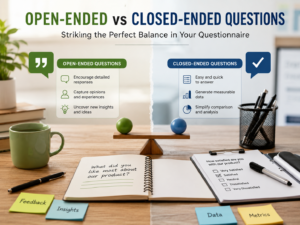
- Open-Ended: Gather detailed feedback.
- Example: “What do you like most about our product?”
- Yes/No: Simple binary questions.
- Example: “Have you used our product before?”
- Ranking: Prioritize options.
- Example: “Rank the following features in order of importance.”
- Matrix Questions: Rate multiple items on the same scale.
- Example: “Rate the following aspects of our service: Speed, Quality, Friendliness.”
Survey Structure
- Introduction: Briefly explain the purpose of the survey and how long it will take.
- Example: “Thank you for participating in our 5-minute customer feedback survey!”
- Sections: Group related questions into sections for better flow.
- Example: Section 1: Demographics, Section 2: Product Feedback, Section 3: Suggestions.
- Progress Bar: Show respondents how far they’ve progressed (if using an online tool).
Avoid Common Pitfalls
- Leading Questions: Don’t steer respondents toward a particular answer.
- Bad: “Don’t you love our new product?”
- Good: “How would you rate our new product?”
- Double-Barreled Questions: Avoid asking two things at once.
- Bad: “How satisfied are you with our price and quality?”
- Good: “How satisfied are you with our price?” and “How satisfied are you with our quality?”
- Overloading: Don’t include too many questions or options.
3. Write Clear and Concise Questions
- Simple Language: Use words that are easy to understand.
- Bad: “What is your perception of the efficacy of our product?”
- Good: “How effective is our product?”
- Specificity: Be precise about what you’re asking.
- Bad: “Do you like our services?”
- Good: “How satisfied are you with our customer support?”
- Avoid Assumptions: Don’t assume respondents have prior knowledge.
- Bad: “How often do you use our advanced features?”
- Good: “Do you use our advanced features? If yes, how often?”
4. Test Your Survey
- Pilot Test: Share the survey with 5–10 people who represent your target audience.
- Feedback: Ask testers for feedback on:
- Clarity of questions.
- Length of the survey.
- Technical issues (e.g., broken links, formatting problems).
- Revise: Make adjustments based on their input.
5. Distribute the Survey
- Channels:
- Email: Send a personalized email with a link to the survey.
- Social Media: Share the survey on platforms like Facebook, Twitter, or LinkedIn.
- Website: Embed the survey on your website or blog.
- In-Person: Use tablets or paper surveys for face-to-face interactions.
- Timing: Choose a time when your audience is most likely to respond (e.g., mid-week for professionals).
- Incentives: Offer rewards like discounts, gift cards, or entries into a prize draw to boost participation.
6. Analyze the Results
- Quantitative Data: Use tools to calculate averages, percentages, and trends.
- Example: “70% of respondents rated our service as excellent.”
- Qualitative Data: Analyze open-ended responses for common themes.
- Example: “Many respondents mentioned that they appreciate our fast delivery.”
- Visualization: Create charts, graphs, or infographics to present the data clearly.
- Segmentation: Break down results by demographics or other criteria to uncover insights.
7. Share and Act on the Findings
- Report: Summarize the results in a clear, actionable format.
- Example: “Key Findings: 80% of customers are satisfied, but 20% want faster delivery.”
- Action Plan: Use the insights to make improvements.
- Example: “We will streamline our delivery process to address customer concerns.”
- Follow-Up: Share the results with stakeholders or respondents to show that their feedback matters.
8. Advanced Tips
- Skip Logic: Use conditional questions to tailor the survey based on previous answers.
- Example: If a respondent says they haven’t used your product, skip questions about product features.
- Anonymous Responses: Assure respondents that their answers are confidential to encourage honesty.
- Mobile-Friendly Design: Ensure the survey is easy to complete on smartphones and tablets.
- A/B Testing: Test different versions of the survey to see which one performs better.
By paying attention to these details, you can create a survey that is engaging, effective, and provides valuable insights for your goals. Let me know if you’d like help with specific parts of the process!